Friday, January 18, 2008

Understand one Simple Factory Pattern

Keywords: Factory Pattern, Design Pattern


在网上经常会看到有关Factory Pattern的文章, 今天我也在blog上发表一下对一个非常简单Factory pattern的见解.


Factory模式其实就是为了封装系统的变化点, 将变化点集中在一起, 一旦这些变化点真的发生变化时, 只要修改一处代码就可以了.


一图胜万言, figure1是表述这样的一个应用: (1)用户选择一个压缩文件, 然后解压. (2)用户选择一个压缩文件, 然后将它转换成自解压格式. 面对这样的需求, 我们该做什么样的结构设计呢?
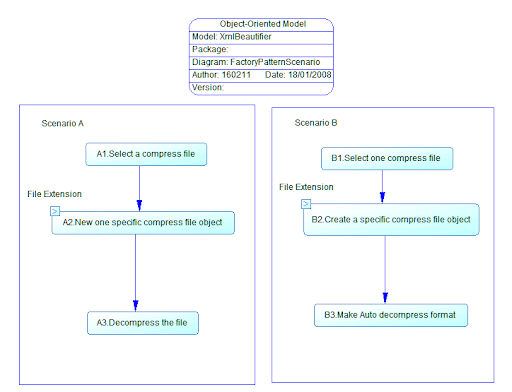


figure1


初步设计是: 目前流行的压缩格式有zip和rar等. 我们会抽象一个压缩格式处理器这样的基类(命名为CompressBase), 不同压缩格式的解压和压缩算法不同, 所以我们又会设计出CompressBase的几个派生类, 比如ZipCompress和RarCompress. 用户可能会选择一个zip文件需要我们处理, 也可能选择一个rar文件. 在程序中, 到底要实例化哪个派生类呢? 一个简单的方法是, 通过文件的扩展名, 作为判断的依据. 最开始, 实现Scenario A中的代码为:


public void Decompress(string fileName)

{

CompressBase compressObj=null ;

string fileExtenstion= FileHelper.GetExtension(fileName) ;

switch (fileExtenstion)

{

case "zip":

{

compressObj= new ZipCompress(fileName);

break ;

}

case "rar"


{

compressObj= new ZipCompress(fileName);

break ;

}

default:

{

return ;

}

}


//uncompress the file


compressObj.Decompress() ;

}

同样, 在实现Scenario B的MakeSelfExe()也和上面代码相似. 这样做有什么问题呢? 问题之一, 如果系统要增加对7zip格式的支持, 需要修改所有生成CompressBase对象的地方. 问题之二, 如果我们不采用通过文件扩展名来判断压缩格式的方法, 而是采用更好的算法时, 也需要在程序中到处修改生成CompressBase对象的代码.


较好的设计方案是: 设计一个Factory类, 它具有一个静态的CreateInstance(string fileName), 该方法封装了生成CompressBase类的算法. 刚开始可以继续采用根据扩展名来生成不同的CompressBase子类. 在要生成 即使将来更新算法或增加新的压缩格式, 也只需要更新CreateInstance().


适用性:


(1) 如果可以确定一个系统中, 仅有Scenario A这个场合, 不会有其他类似的功能, 就没有必要使用这种模式.


(2) 对于Scenario A, 这个场景的入口是唯一的. 如果操作的入口和派生类的个数一样的话, 也没有必要使用这种模式, 比如在画图程序中, 虽然Triangle类和Rectangle类都是Shape类的子类, 但画图程序的工具面板上有画三角和矩形两个ToolButton, 也没有必要再创建一个Factory类来负责生成派生类对象.

Wednesday, January 16, 2008

My string helper class in C#


Keywords: C#, string helper class.


下面的类是我经常会使用到的, 它是用来帮助从一个string中提取substring. 我在设计这些代码时, 主要考虑的是代码的易用性, 并没有太多地在意执行效率的问题. 注意:这些功能通常也可以通过正则表达式来实现, 但不如下面的代码来的快.


using System;
using System.Collections.Generic;
using System.Text;

namespace LiuHarry.Utils.Foundation
{
public class StrHelper
{


/// <summary>
/// return the first nested-substring of source string be contained in enveloped pattern.
/// </summary>
/// <param name="sourceStr">the entire source string</param>
/// <param name="leftSeparator">left separator string of pattern</param>
/// <param name="rightSeparator">right separator string of pattern</param>
/// <param name="patternEndIndex">pattern end index in source string </param>
/// <returns>nested-substring</returns>
private static string GetNestedString(string sourceStr, string leftSeparator, string rightSeparator, out int patternEndIndex)
{
patternEndIndex = -1;
if (String.IsNullOrEmpty(sourceStr) )
return null ;

int startIndex = sourceStr.IndexOf(leftSeparator);
if (startIndex<0)
return null ;
else
{
startIndex = startIndex + leftSeparator.Length;
}
int endIndex = sourceStr.IndexOf(rightSeparator, startIndex + 1);
if (endIndex<0)
{
return null;
}
else // "123##"67"
{
patternEndIndex = endIndex + rightSeparator.Length - 1;
}
string result = sourceStr.Substring(startIndex, endIndex - startIndex);
return result;
}


/// <summary>
/// return the first nested-substring of source string be contained in enveloped pattern in sourceStr.
/// </summary>
/// <param name="sourceStr">the entire source string</param>
/// <param name="leftSeparator">left separator string of pattern</param>
/// <param name="rightSeparator">right separator string of pattern</param>
/// <returns>nested-substring</returns>
public static string GetNestedSubString(string sourceStr, string leftSeparator, string rightSeparator)
{
int patternEndIndex;
return GetNestedString(sourceStr, leftSeparator, rightSeparator, out patternEndIndex);
}


/// <summary>
/// return given ignoreMatchedCount nested-substring of source string be contained in enveloped pattern
/// </summary>
/// <param name="sourceStr">the entire source string</param>
/// <param name="leftSeparator">left separator string of pattern</param>
/// <param name="rightSeparator">right separator string of pattern</param>
/// /// <param name="ignoreMatchedCount">ignore the match pattern count</param>
/// <returns>nested-substring</returns>
public static string GetNestedSubString(string sourceStr,string leftSeparator,string rightSeparator,int ignoreMatchedCount)
{
int patternEndIndex;
string tempStr = sourceStr;
string resultStr = null ;
for (int i=0;i<=ignoreMatchedCount;i++)
{
resultStr = GetNestedString(tempStr, leftSeparator, rightSeparator, out patternEndIndex);
tempStr = tempStr.Substring(patternEndIndex+1);
}
return resultStr;
}


/// <summary>
/// return all nested-substring of source string be contained in enveloped pattern
/// </summary>
/// <param name="sourceStr">the entire source string </param>
/// <param name="leftSeparator">left separator string of pattern</param>
/// <param name="rightSeparator">right separator string of pattern</param>
/// <returns>a List<string> collection of all nested-substring </returns>
public static List<string> GetAllNestedSubString(string sourceStr, string leftSeparator, string rightSeparator)
{
List<string> listNestedSubStr = new List<string>();
int ignoreMatchedCount= 0 ;
string nestSubStr=null ;
while (true )
{
nestSubStr=GetNestedSubString( sourceStr, leftSeparator, rightSeparator,ignoreMatchedCount);
if (nestSubStr==null)
break ;
else
{
listNestedSubStr.Add(nestSubStr);
ignoreMatchedCount = ignoreMatchedCount+1;
}
}
return listNestedSubStr ;
}
}
}

Tuesday, January 15, 2008

Singleton Pattern Framework Code

Keywords: C#, Design Pattern, Singleton


The following code block is the most simple, however it is thread-safe. Refer to http://msdn2.microsoft.com/en-us/library/ms954629.aspx


// .NET Singleton
sealed class Singleton
{
private Singleton() {}
public static readonly Singleton Instance = new Singleton();
}

some more complex implemention are as follows,


/// <summary>

/// Class implements singleton pattern.

/// </summary>

public class Singleton

{

// Private constructor to avoid other instantiation

// This must be present otherwise the compiler provide

// a default public constructor

private Singleton()

{

}


/// <summary>

/// Return an instance of <see cref="Singleton"/>

/// </summary>

public static Singleton Instance

{

get

{

/// An instance of Singleton wont be created until the very first

/// call to the sealed class. This a CLR optimization that ensure that

/// we have properly lazy-loading singleton.

return SingletonCreator.CreatorInstance;

}

}


/// <summary>

/// Sealed class to avoid any heritage from this helper class

/// </summary>

private sealed class SingletonCreator

{

// Retrieve a single instance of a Singleton

private static readonly Singleton _instance = new Singleton();


/// <summary>

/// Return an instance of the class <see cref="Singleton"/>

/// </summary>

public static Singleton CreatorInstance

{

get { return _instance; }

}

}

}

上面的代码没有考虑singleton对象的线程安全问题. 在用VS2005向导生成Settings类和Resource类的时候, 你会注意到Setting类需要考虑线程同步问题, 因为程序可能不仅仅会读取外部的config文件, 也有可能会修改config文件的信息. 而Resource类不需要考虑线程同步的问题, 因为一般程序不会修改Resource.res的文件.


那么怎样为singleton类增加线程同步问题呢? 查看Settings.Designer.cs文件, 会发现在创建defaultInstance时候, 用了下面的代码:


private static Settings defaultInstance = ((Settings)(global::System.Configuration.ApplicationSettingsBase.Synchronized(new Settings())));


通过Reflector工具, 可以看到ApplicationSettingsBase.Synchronized()方法是个static方法, 传入的参数就是一个Settings类的实体, 这个方法仅仅是将settings对象的 IsSynchronized属性设置为True, 再看一下ApplicationSettingsBase类的Save()方法, 读取的方法和Save()方法类似. 就明白它是怎样完成线程同步的.


//ApplicationSettingsBase class

public virtual void Save()

{

if (this.IsSynchronized)

{

lock (this)

{

this.SaveCore();

return;

}

}

this.SaveCore();

}


java official Design Pattern


Keywords: Java, Design Pattern


The following resources are great, because they are from Sun. Pasted from http://java.sun.com/blueprints/patterns/


Java BluePrints Patterns Catalog
This section contains the Java BluePrints catalog of recommended J2EE patterns. It includes code samples from the Java BluePrints reference applications such as the Java Pet Store sample application.


Core J2EE Patterns
This section contains the online version of the best-selling book on J2EE patterns from the Sun Java Center architects, Deepak Alur, John Crupi, and Dan Malks.


Big Picture http://java.sun.com/blueprints/corej2eepatterns/Patterns/index.html


References and Resources
This section lists references which are cited throughout the J2EE pattern catalog.


Designing Enterprise Applications
with the J2EETM Platform, Second Edition http://java.sun.com/blueprints/guidelines/designing_enterprise_applications_2e/DEA2eTOC.html


J2EE Patterns Mailing List
We want your feedback! Join the j2eepatterns-interest mailing list to discuss J2EE patterns.


Monday, January 14, 2008

How to activate one class object by class name


Keywords: Assembly, Activator, CreateInstance


If you use plug-in architecture, you will encounter how to activate one class object dynamically. There are 2 different scenarios.
(1)How to load class object by its class name in the same assembly. Please refer to Load Class().


(2)How to load class object in another assembly? Please refer to LoadPlugin_1() and LoadPlugin_2()


/// <summary>
/// Load class object in the same assembly
/// </summary>
private void LoadClass()
{
string type = "BT.DocxRichTextWriter";
//BT.DocxRichTextWriter is class full qualified name
string classTypeStr = type;
System.Reflection.Assembly assembly = System.Reflection.Assembly.GetExecutingAssembly();
Type classType = assembly.GetType(classTypeStr);
object pluginObject = Activator.CreateInstance(classType);
}


/// <summary>
/// Load plugins by method 1
/// </summary>
private void LoadPlugin_1()
{
string type = "BT.DocxRichTextWriter, DocxSimpleObjWriter";
//BT.DocxRichTextWriter is class full qualified name, DocxSimpleObjWriter is assembly name with out extension.

string classFullType = type;
string[] classInfo = classFullType.Split(',');
System.Reflection.Assembly assembly = System.Reflection.Assembly.Load(classInfo[1]);
Type classType = assembly.GetType(classInfo[0]);
object pluginObject = Activator.CreateInstance(classType);
}

/// <summary>
/// load plugin by method 2
/// </summary>
private void LoadPlugin_2()
{
string type = "BT.DocxRichTextWriter, DocxSimpleObjWriter";
//BT.DocxRichTextWriter is class full qualified name, DocxSimpleObjWriter is assembly name with out extension.

string classFullType = type;
object pluginObject = Activator.CreateInstance(Type.GetType(classFullType));
}

how to build db connection string


Keywords: connectionstring, connection db, JDBC driver


There are too many connection technologies for windows application development such as ODBC, OLEDB, .Net Connection. It is hard to remember all kinds of connection format for all main stream db servers. Luckily, there is one website designed to provide all connection strings. That is http://www.connectionstrings.com/


For JDBC connection tech, there is another web http://www.minq.se/products/dbvis/drivers.html . In this web, you can find what you want.


Plugin architecture 1- overview

Keywords: C#, Plugin architecture


Many tools provide plugin architeture, such as Eclipse, NotePad++. The plugin mechanism will enhance the host application greatly.


The plugins are always located in other assmemblies other than the host application. You can enhance your applicaiton even though the host applicaiton was changed if you have used the plugin architecture. To help conceptualize the communication that occurs between a host application and a plug-in, the Strategy design pattern can be applied.


The gist of the Strategy design pattern is to decouple the functionality of a solution from its container. This decoupling is achieved by separating the implementation of the host application and the things it must do into strategies. Communication between the host application and its strategies is then done through a well-defined interface. This separation provides two immediate benefits. First, anytime a software project can be broken down into smaller discrete units, it is a bonus to the engineering process. Smaller code pieces are easier to build and maintain. The second benefit is the ability to switch strategies without affecting the operation of the host application. The host application is not concerned with specific strategies, just the common mechanism to communicate with the strategies.


Plugins: PluginA(In AssemblyA) , PluginB1(In AssemblyB), PluginB2(in AssemblyB)

One C# project based plugin arch, download 7zip format source