Showing posts with label DesignPattern. Show all posts

Saturday, September 27, 2008

Using Ninject(one DI container)

在设计中, 经常会遇到这样的情况, 在一个类中要创建或使用另一个类的实例, 暂且将前一个类称为大类, 后一个类称为小类, 也许小类有很多变种, 我们会根据不同的情况, 让大类使用不同的小类变种. 可以看出这里有一个耦合关系, 一个好的办法是使用依赖注入模式(Dependency Inject), Martin Fowler 有个非常精彩的文章专门讲述DI).
DI原理其实很简单, 我们设计的大类要依赖于小类的接口或基类, 而不是一个具体的小类, 同时不要在大类中创建小类实例, 而是通过大类的构造子或property将小类的实例传进来即可.
目前.Net领域有不少DI容器框架, (这里是DI容器框架列表), 这些框架主要有两个功能, (1)帮助完成依赖的注册与依赖实例的创建, 即绑定小类接口和某个具体小类, 绑定的地方不是在大类中, 所以实现了解耦. (2)更高级的功能是, DI 容器框架可以帮助我们创建大类实例, 就像是一个Factory工厂方法一样, 当然大类所依赖的小类, 也不同我们手动创建, 容器自动按照我们定义的小类绑定关系来创建小类实例.
Ninject是一个新的DI框架, 它的特点是:
(1)不需要使用Xml来定义绑定关系, 使用一个自定义的Module类(基类为StandardModule)来定义绑定关系;
(2)不仅仅支持constructor注入, 而且支持property注册;
(3)对于constrctor注入, 构造子还可以包含其他类型参数, 不仅仅是所依赖的类型参数.
(4)对于非constructor注入, 不仅仅支持无参构造子, 而且支持带参构造子.
(5)支持基于类型的条件绑定, 可以使用Bind().To().ForMembersOf();
(6)部分支持基于variable的Context的条件绑定, 示例代码中对此有说明.(Ninject支持另一种条件绑定, 但它需要在大类的代码加上Parameter attribute或Method attribute, 增加了大类和小类的耦合度, 所以我不喜欢, 好在基于context variable的绑定基本够用了)
(7)对于利用DI容器创建的对象, 可以在定义绑定时, 指定对象的生命周期, 比如Singleton以及SingleCall的生命周期模式.

下面是一个使用Ninject的简单示例, 需要添加Ninject.core和Ninject.condition两个assembly.
主程序类和自定义的Module类:


using System;
using System.Collections.Generic;
using System.Linq;
using System.Text;
using System.Threading;

using Ninject.Core;
using Ninject.Conditions;
using Ninject.Core.Behavior;
using Ninject.Core.Parameters;
using Ninject.Core.Activation;

namespace NinjectDemo
{
class Program
{
static void Main(string[] args)
{
#region DI: Old way
IEditor editor = new NotePad();
var csProgrammer = new WindowsProgrammer(editor);
csProgrammer.WriteCode();
#endregion

#region DI container
#region Initialization for using Ninject
var module = new ProgrammerModule();
IKernel kernel = new StandardKernel(module);
#endregion

#region Simple inject
var vbProgrammer = kernel.Get<WindowsProgrammer>();
vbProgrammer.WriteCode();

//Get correct concrete class according to binding condition
var linuxProgrammer = kernel.Get<LinuxProgrammer>();
linuxProgrammer.WriteCode();
#endregion

#region Including other parameters rather than inject interface
Dictionary<string, object> param = new Dictionary<string, object>();
//there is another parameter named firstName in constructor
param.Add("firstName", "Harry-Mac OS");
var macProgrammer = kernel.Get<MacProgrammer>(With.Parameters.ConstructorArguments(param));
macProgrammer.WriteCode();
#endregion

#region Control binding by context variable
IParameterCollection pc = With.Parameters.ContextVariable("OS", "Mac").ConstructorArguments(param);
var programmer = kernel.Get<Programmer>(pc);
macProgrammer.WriteCode();
#endregion

#endregion DI container

Console.WriteLine("Enter any key to exit...");
Console.ReadKey();
}
}


class ProgrammerModule : StandardModule
{
/// <summary>
/// 注册接口和对象的绑定
/// </summary>
public override void Load()
{
//This is a default bind for IEditor inteface
Bind<IEditor>().To<NotePad>();
//Bind<IEditor>().To<NotePad>().Always();// same to the above line

//This is a condtional bind for IEditor injection
Bind<IEditor>().To<Vi>().ForMembersOf<LinuxProgrammer>();
//or the following code
//Bind<IEditor>().To<Vi>().OnlyIf(c => c.Member.DeclaringType == typeof(LinuxProgrammer));
//or the following code
//Bind<IEditor>().To<Vi>().OnlyIf(delegate(IContext c) { return c.Member.DeclaringType == typeof(LinuxProgrammer); });

Bind<IEditor>().To<Vi>().ForMembersOf<MacProgrammer>();

//This is another kind of conditional bind.
//我们获取对象要用kernel.Get<T1>()方法, 绑定用Bind<T2>()方法,
// 这种context绑定仅仅适合于T1和T2同一类型或基于同一类型
Bind<Programmer>().To<MacProgrammer>().Only(When.Context.Variable("OS") == "Mac");
}

/// <summary>
/// Load2 方法在本项目中其实没用, 只是为了列出Ninject在绑定时可指定对象的生命周期
/// </summary>
public void Load2()
{
//每次调用kernel.Get<>(), 总是返回一个新的对象, 如果Remoting中讲的SingleCall对象
Bind<IEditor>().To<NotePad>();
//Bind<IEditor>().To<NotePad>().Using<TransientBehavior>(); //same as the above

//获取的对象是Singleton对象, 即使是不同线程, 获得的对象总是同一个
Bind<IEditor>().To<NotePad>().Using<SingletonBehavior>();

//One instance of the type will be created per web request, and will be destroyed when the request ends.
Bind<IEditor>().To<NotePad>().Using<OnePerRequestBehavior>();

//在同一个线程中, 每次调用kernel.Get<>()获取的对象总是同一个
Bind<IEditor>().To<NotePad>().Using<OnePerThreadBehavior>();
}
}

}


下面是IEditor接口和实现类:


using System;
using System.Collections.Generic;
using System.Linq;
using System.Text;

namespace NinjectDemo
{

interface IEditor
{
string Code();
}

public class Vi : IEditor
{
public string Code()
{
return "This is Vi editor";
}
}

public class NotePad : IEditor
{
public string Code()
{
return "This is NotePad editor";
}
}
}

下面是Programmer基类和派生类:


using System;
using System.Collections.Generic;
using System.Linq;
using System.Text;

#region Ninject namespace
using Ninject.Conditions;
using Ninject.Core.Behavior;
using Ninject.Core;
#endregion

namespace NinjectDemo
{
abstract class Programmer
{
IEditor m_Editor;
public Programmer(IEditor editor)
{
this.m_Editor = editor;
}

public virtual void WriteCode()
{
Console.WriteLine(m_Editor.Code());
}

}

class WindowsProgrammer:Programmer
{
public WindowsProgrammer(IEditor editor)
: base(editor)
{
}
}

class MacProgrammer : Programmer
{
string m_FirstName;

[Inject]
public MacProgrammer(IEditor editor, string firstName)
: base(editor)
{
m_FirstName = firstName;
}

public override void WriteCode()
{
Console.Write( m_FirstName+" , ");
base.WriteCode();
}
}

class LinuxProgrammer : Programmer
{
[Inject]
public LinuxProgrammer(IEditor editor)
: base(editor)
{
}
}
}

Wednesday, May 21, 2008

Thread safe Singleton pattern

关于Singleton模式的几个误区
网上有很多Singleton模式的样板, 多数是错误的, 下面的文档提出了很好的样板.
http://msdn.microsoft.com/en-us/library/ms998558.aspx
http://www.devhood.com/tutorials/tutorial_details.aspx?tutorial_id=486
http://www.yoda.arachsys.com/csharp/singleton.html
http://codebetter.com/blogs/steve.hebert/archive/2005/12/16/135697.aspx
另外特别说明的是:
1. Singleton class的Instance属性或者公开方法GetInstance()不应带参数, 也就是说无论在什么情况下获取Singleton类的对象, 都始终是那一个, 不会有不同的实例.
2. Singleton类不能是Static类, 因为Static类不能包含任何实例方法(包括实例constructor). 但Singleton类一定要包含一个static变量(比如_Instance, 其类型为Singleton)来存储Singleton类的实例, 那为什么必须是static变量呢? 因为我们在使用Singleton类的时候, 不是通过constructor类创建一个Singleton对象, 而是需要通过调用一个static方法(比如GetInstance())来创建一个实例, 而static方法只能使用static变量, 不能使用任何非static变量, 这就要求存放Singleton实例的内部变量必须是static变量.
3. Singleton类必须要使用lock, 否则就不是线程安全的, 除非_Instance这个static变量, 同时被声明为readonly.
4. 一般情况下, 不要Singleton模式, 不必使用Double check+Lock这样的代码, 因为写法复杂, 而且容易会造成线程不安全. 尤其是在多核机器上. 可以直接使用Single Check+Lock写法, 简单而又安全.
Bad Code
Good Code
// Bad code! Do not use! Not Thread safe, 
public sealed class Singleton
{
static Singleton instance=null;
Singleton()
{
}
public static Singleton Instance
{
get
{
if (instance==null)
{
instance = new Singleton();
}
return instance;
}
}
}
//Thread safe, 不是Lazy load, 特点:实现简单
//But performance suffers as a lock is acquired every time the instance is requested
public sealed class Singleton
{
static Singleton instance = null;
static readonly object padlock = new object();

Singleton()
{
}

public static Singleton Instance
{
get
{
lock (padlock)
{
if (instance == null)
{
instance = new Singleton();
}
return instance;
}
}
}
}


// Try to double Check, But still is not thread safe! Do not use!
//Thread safe issue see:
//
http://www.cs.umd.edu/~pugh/java/memoryModel/DoubleCheckedLocking.html
public sealed class Singleton
{
static Singleton instance=null;
static readonly object padlock = new object();

Singleton()
{
}

public static Singleton Instance
{
get
{
if (instance==null)
{
lock (padlock)
{
if (instance==null)
{
instance = new Singleton();
}
}
}
return instance;
}
}
}
//Thread safe,虽然不是Lazy load. 它使用了static Initilization,特点:简单
public sealed class Singleton
{
private static readonly Singleton instance = new Singleton();

private Singleton(){}

public static Singleton Instance
{
get
{
return instance;
}
}
}
// double Check, Thread not safe
//Thread safe issue see:
//
http://www.cs.umd.edu/~pugh/java/memoryModel/DoubleCheckedLocking.html

public sealed class Singleton
{
static Singleton instance=null;
static readonly object padlock = new object();

Singleton()
{
}

public static Singleton Instance
{
get
{
if (instance==null)
{
lock (padlock)
{
if (instance==null)
{
//线程不安全,因为编译器会进行代码优化,
//临时变量tempInstance会被舍弃,这样就编程了线程不安全代码了
Singleton tempInstance=new Singleton();
instance = tempInstance;

}
}
}
return instance;
}
}
}
// double Check, Thread safe
public sealed class Singleton
{
volatile static Singleton instance=null;
static readonly object padlock = new object();

Singleton()
{
}

public static Singleton Instance
{
get
{
if (instance==null)
{
lock (padlock)
{
//线程安全,因为instance被标记为volatile
if (instance==null)
{
Instance=new Singleton();
}
}
}
return instance;
}
}
}

thread-safe, not quite as lazy, without using locks
thread-safe, fully lazy instantiation
public sealed class Singleton
{
static readonly Singleton instance=new Singleton();

// Explicit static constructor to tell C# compiler
// not to mark type as beforefieldinit
static Singleton()
{
}

Singleton()
{
}

public static Singleton Instance
{
get
{
return instance;
}
}
}
public sealed class Singleton
{
Singleton()
{
}

public static Singleton Instance
{
get
{
return Nested.instance;
}
}

class Nested
{
// Explicit static constructor to tell C# compiler
// not to mark type as beforefieldinit
static Nested()
{
}

internal static readonly Singleton instance = new Singleton();
}
}

Monday, March 31, 2008

My offen misunderstand things of CSharp

对于C#语言总有一些容易混淆的东西, 比如App Domain, lock语句块, 线程安全, deadlock和Content, 以及类的析构子和Finializer.
我总结了一个文章, http://docs.google.com/Doc?id=ddhzfwz6_1gkm272fd

Thursday, February 28, 2008

2 UML tutorial

Keywords: UML 2.1


网上关于UML的文章很多, 但下面2篇文章很实用.


http://dn.codegear.com/article/31863(这个文章还带测试题目)


http://www.sparxsystems.com.au/resources/uml2_tutorial/index.html


点空间http://www.dotspace.idv.tw/ 也有比较好的文章.

Tuesday, January 29, 2008

XmlBeautifier tool development

Keywords: Event, Class Inherit, Drag and drop supported


Preface


一直想写一个具有实际功能的C#例程, 来加深我对C# Event和Delegate的理解. 这个例程最好不要太庞大, 因为庞大的程序需要考虑的东西太多, 容易跑题. 碰巧在项目中, 经常需要查看Word2007的docx文件包中Xml文件(注: docx格式为zip格式, 里面包含很多xml文件, 但这些xml文件的element没有缩进). 我喜欢用Notepad++这个编辑器, 但用Notepad++不支持没有缩进的xml的collapse element功能, 浏览起来并不直观. 所以打算写一个小工具, 能够缩进xml的element. 这个工具我命名为XmlBeautifier.


Dev Environment:


Visual Studio 2005, .Net Framework 2.0, .Net Framework 3.0


System Design


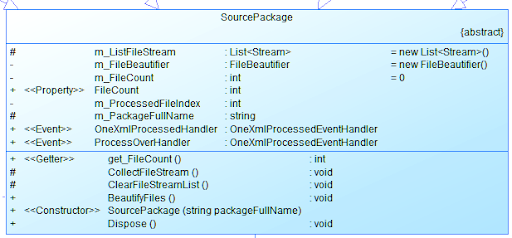
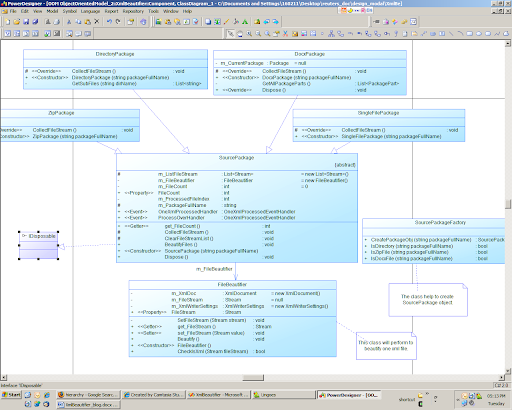
XmlBeautifier设计初衷是能处理docx中的xml文件, 为了使它更具通用性, 它应该还能处理单个的xml文件, 最好还能批量处理一个目录下的所有xml文件. 我设计一个抽象基类SourcePackage, 它有3个子类, 分别是DirectoryPackage(负责批量处理某个目录下所有文件的美化), DocxPackage(负责处理docx文件), 以及SingleFilePackage(负责处理单一xml文件) .


SourcePackage类是整个程序的核心. CollectFileStream()是一个抽象方法, 负责获取这个包中的所有文件的流, 三个子类都要实现这个方法; 因为需要将包中文件以流的形式加载到内存, 所以SourcePackage类需要实现IDisposable接口, 来释放文件流资源; BeautifyFiles()负责执行xml文件的美化工作, 当把所有的文件以流的形式加载到一个m_ListFileStream后, BeautifyFiles()方法就很简单, 循环各个文件流, 分别美化它们.


Extra Features Design


一个好的程序应该是用户友好型的, 对于我们这样的小工具, 也要做到这样. 为此, 我为这个工具增加2个必要的feature. F1. 用户能够处理的进度; F2.工具支持文件(或目录)的拖拉处理.


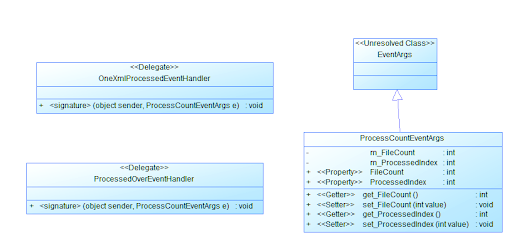
F1. 为了是工具能实时显示处理的进度, 需要为SourcePackage类增加两个事件Handler, 一个是OneXmlProcessedHandler(当一个文件被处理完后, 这个Handler会被Invoke); 另一个是ProcessOverHandler(当整个文件包被处理完毕后, 这个Handler会被Invoke). 这2个Handler的类型为delegate, 分别为OneXmlProcessedEventHandler, ProcessOverEventHandler. 为了能将Package的文件总数和当前处理的文件Index传给UI类, 我定义了ProcessCountEventArgs这个类, 这样UI类的EventHandler就能获取这些信息. 有关事件的详细论述, 请看我的另一篇文章 .


F2. 拖拉的支持


C#的Form和Panel都有个bool型属性AllowDrop, 只要AllowDrop=true, 你就可以在资源管理器中将文件或目录拖到Form(或Panel)上, 只不过鼠标Cursor不对头, 在Panel的DragEnter事件中设置DragEventArgs参数的Effect就可以.


当文件 ( 或目录 )Drop 到 Panel 后 , 需要美化这些文档 , 在 Panel 的 DragDrop 事件中调用相应的代码就可 . 调用之前需判断 Drop 下的东西是否是文件或目录 .


private void panelDrop_DragDrop(object sender, DragEventArgs e)


{


if (e.Data.GetDataPresent(DataFormats.FileDrop))


{


String[] filenames = (String[])e.Data.GetData(DataFormats.FileDrop);


textBoxSourcePath.Text = filenames[0];


ProcessBeautify() ;


}


}


主要类的 Class Diagram 见下图 .


代码下载 (xmlBeautifier_Src.zip ), 可执行文件下载 (XmlBeautifier_Bin.zip )

Sunday, January 27, 2008

understand event of c#

Keywords: Event, delegate, Publish and subscribe pattern


我打算设计一个程序, 它能一次性美化一个目录之下所有的xml文件, 在UI上, 要求能显示处理的进度(即每处理完一个xml文件, UI的ProgressBar就变化一下). 美化xml的由SourcePackage类的BeautifyFiles方法完成, 而UI是另一个类FormMain. 显然这要处理SourcePackage类和FormMain类之间的通讯问题. 怎样解决这个问题呢? 这其实这是一个如何解耦的问题.


如果你学过C语言, 你会很自然想到使用回调函数, 即在FormMain类中新增一个方法, 比如UpdateProgressBar(), 然后将UpdateProgressBar()这个函数传给SourcePackage.BeautifyFiles()方法. 这确实是一个解决方法. 即将一个被调用者传给调用者. 这种方法直接有效, 但耦合度很高.


另一个方案是, 采用Publish-Subscribe模式, 使用这个模式, 首先要定义一个通知, 即发布什么, 以及订阅什么. 就本实例来讲, 这个通知就是一个xml文件已经被处理完了, 在UI类中, 订阅这个通知, 然后再编写这个通知的一个Handler函数(即进行更新进度条).


C#就是采用Publish-Subscribe来实现Event, 因为C#Delegate支持多播, 所以非常完美地实现了Publish-subscribe; 如果你使用C++, 也可采用了Observer模式来实现Event. 我们用C#的Event来实现设计要求. 设计的详细思路是:


在Publish方(Publish方多数为一个服务的服务端), 需要完成的工作是:


(1) 如果需要的话,使用delegate来定义通知类型, (一般的EventHandler已经在Framework中定义了, 特殊的Handler需要自定义)


public delegate void OneXmlProcessedEventHandler(object sender, ProcessCountEventArgs e);


(2) 在SourcePackage类中, 使用event关键字来发布通知.


public event OneXmlProcessedEventHandler OneXmlProcessed;


(3) 在SourcePackage.BeautifyFiles()触发这个通知的Handler.


foreach (Stream fileStream in m_ListFileStream)


{


m_FileBeautifier.FileStream = fileStream;


m_FileBeautifier.Beautify();


if (OneXmlProcessed != null)


{


eventArgs.ProcessedIndex = eventArgs.ProcessedIndex+1 ;


OneXmlProcessed(this, eventArgs);


}


}


在Subscribe方(Subscribe方多为服务的消费端), 需要完成的工作是:


(1) 订阅这个通知


SourcePackage sourcePackage = new SourcePackage(packageFullName);


sourcePackage.OneXmlProcessed += new OneXmlProcessedEventHandler(OneXmlProcessedHandler);


(2) 编写通知Handler


void OneXmlProcessedHandler(object sender, ProcessCountEventArgs e)


{


const string progressIndicator="{0} of {1} is proceeded!" ;


toolStripStatusLabel1.Text = string.Format(progressIndicator, e.ProcessedIndex, e.FileCount);


toolStripProgressBar1.Value = e.ProcessedIndex;


Application.DoEvents();


}


Friday, January 18, 2008

Understand one Simple Factory Pattern

Keywords: Factory Pattern, Design Pattern


在网上经常会看到有关Factory Pattern的文章, 今天我也在blog上发表一下对一个非常简单Factory pattern的见解.


Factory模式其实就是为了封装系统的变化点, 将变化点集中在一起, 一旦这些变化点真的发生变化时, 只要修改一处代码就可以了.


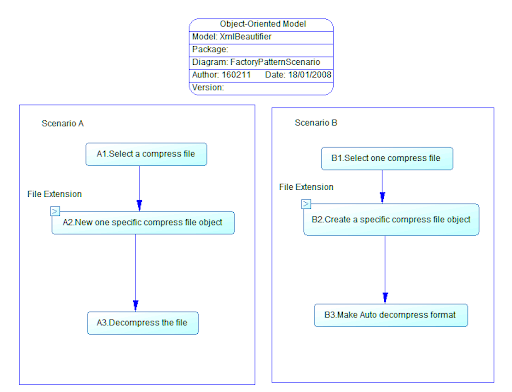
一图胜万言, figure1是表述这样的一个应用: (1)用户选择一个压缩文件, 然后解压. (2)用户选择一个压缩文件, 然后将它转换成自解压格式. 面对这样的需求, 我们该做什么样的结构设计呢?


figure1


初步设计是: 目前流行的压缩格式有zip和rar等. 我们会抽象一个压缩格式处理器这样的基类(命名为CompressBase), 不同压缩格式的解压和压缩算法不同, 所以我们又会设计出CompressBase的几个派生类, 比如ZipCompress和RarCompress. 用户可能会选择一个zip文件需要我们处理, 也可能选择一个rar文件. 在程序中, 到底要实例化哪个派生类呢? 一个简单的方法是, 通过文件的扩展名, 作为判断的依据. 最开始, 实现Scenario A中的代码为:


public void Decompress(string fileName)

{

CompressBase compressObj=null ;

string fileExtenstion= FileHelper.GetExtension(fileName) ;

switch (fileExtenstion)

{

case "zip":

{

compressObj= new ZipCompress(fileName);

break ;

}

case "rar"


{

compressObj= new ZipCompress(fileName);

break ;

}

default:

{

return ;

}

}


//uncompress the file


compressObj.Decompress() ;

}

同样, 在实现Scenario B的MakeSelfExe()也和上面代码相似. 这样做有什么问题呢? 问题之一, 如果系统要增加对7zip格式的支持, 需要修改所有生成CompressBase对象的地方. 问题之二, 如果我们不采用通过文件扩展名来判断压缩格式的方法, 而是采用更好的算法时, 也需要在程序中到处修改生成CompressBase对象的代码.


较好的设计方案是: 设计一个Factory类, 它具有一个静态的CreateInstance(string fileName), 该方法封装了生成CompressBase类的算法. 刚开始可以继续采用根据扩展名来生成不同的CompressBase子类. 在要生成 即使将来更新算法或增加新的压缩格式, 也只需要更新CreateInstance().


适用性:


(1) 如果可以确定一个系统中, 仅有Scenario A这个场合, 不会有其他类似的功能, 就没有必要使用这种模式.


(2) 对于Scenario A, 这个场景的入口是唯一的. 如果操作的入口和派生类的个数一样的话, 也没有必要使用这种模式, 比如在画图程序中, 虽然Triangle类和Rectangle类都是Shape类的子类, 但画图程序的工具面板上有画三角和矩形两个ToolButton, 也没有必要再创建一个Factory类来负责生成派生类对象.

Tuesday, January 15, 2008

Singleton Pattern Framework Code

Keywords: C#, Design Pattern, Singleton


The following code block is the most simple, however it is thread-safe. Refer to http://msdn2.microsoft.com/en-us/library/ms954629.aspx


// .NET Singleton
sealed class Singleton
{
private Singleton() {}
public static readonly Singleton Instance = new Singleton();
}

some more complex implemention are as follows,


/// <summary>

/// Class implements singleton pattern.

/// </summary>

public class Singleton

{

// Private constructor to avoid other instantiation

// This must be present otherwise the compiler provide

// a default public constructor

private Singleton()

{

}


/// <summary>

/// Return an instance of <see cref="Singleton"/>

/// </summary>

public static Singleton Instance

{

get

{

/// An instance of Singleton wont be created until the very first

/// call to the sealed class. This a CLR optimization that ensure that

/// we have properly lazy-loading singleton.

return SingletonCreator.CreatorInstance;

}

}


/// <summary>

/// Sealed class to avoid any heritage from this helper class

/// </summary>

private sealed class SingletonCreator

{

// Retrieve a single instance of a Singleton

private static readonly Singleton _instance = new Singleton();


/// <summary>

/// Return an instance of the class <see cref="Singleton"/>

/// </summary>

public static Singleton CreatorInstance

{

get { return _instance; }

}

}

}

上面的代码没有考虑singleton对象的线程安全问题. 在用VS2005向导生成Settings类和Resource类的时候, 你会注意到Setting类需要考虑线程同步问题, 因为程序可能不仅仅会读取外部的config文件, 也有可能会修改config文件的信息. 而Resource类不需要考虑线程同步的问题, 因为一般程序不会修改Resource.res的文件.


那么怎样为singleton类增加线程同步问题呢? 查看Settings.Designer.cs文件, 会发现在创建defaultInstance时候, 用了下面的代码:


private static Settings defaultInstance = ((Settings)(global::System.Configuration.ApplicationSettingsBase.Synchronized(new Settings())));


通过Reflector工具, 可以看到ApplicationSettingsBase.Synchronized()方法是个static方法, 传入的参数就是一个Settings类的实体, 这个方法仅仅是将settings对象的 IsSynchronized属性设置为True, 再看一下ApplicationSettingsBase类的Save()方法, 读取的方法和Save()方法类似. 就明白它是怎样完成线程同步的.


//ApplicationSettingsBase class

public virtual void Save()

{

if (this.IsSynchronized)

{

lock (this)

{

this.SaveCore();

return;

}

}

this.SaveCore();

}


java official Design Pattern


Keywords: Java, Design Pattern


The following resources are great, because they are from Sun. Pasted from http://java.sun.com/blueprints/patterns/


Java BluePrints Patterns Catalog
This section contains the Java BluePrints catalog of recommended J2EE patterns. It includes code samples from the Java BluePrints reference applications such as the Java Pet Store sample application.


Core J2EE Patterns
This section contains the online version of the best-selling book on J2EE patterns from the Sun Java Center architects, Deepak Alur, John Crupi, and Dan Malks.


Big Picture http://java.sun.com/blueprints/corej2eepatterns/Patterns/index.html


References and Resources
This section lists references which are cited throughout the J2EE pattern catalog.


Designing Enterprise Applications
with the J2EETM Platform, Second Edition http://java.sun.com/blueprints/guidelines/designing_enterprise_applications_2e/DEA2eTOC.html


J2EE Patterns Mailing List
We want your feedback! Join the j2eepatterns-interest mailing list to discuss J2EE patterns.


Monday, January 14, 2008

Plugin architecture 1- overview

Keywords: C#, Plugin architecture


Many tools provide plugin architeture, such as Eclipse, NotePad++. The plugin mechanism will enhance the host application greatly.


The plugins are always located in other assmemblies other than the host application. You can enhance your applicaiton even though the host applicaiton was changed if you have used the plugin architecture. To help conceptualize the communication that occurs between a host application and a plug-in, the Strategy design pattern can be applied.


The gist of the Strategy design pattern is to decouple the functionality of a solution from its container. This decoupling is achieved by separating the implementation of the host application and the things it must do into strategies. Communication between the host application and its strategies is then done through a well-defined interface. This separation provides two immediate benefits. First, anytime a software project can be broken down into smaller discrete units, it is a bonus to the engineering process. Smaller code pieces are easier to build and maintain. The second benefit is the ability to switch strategies without affecting the operation of the host application. The host application is not concerned with specific strategies, just the common mechanism to communicate with the strategies.


Plugins: PluginA(In AssemblyA) , PluginB1(In AssemblyB), PluginB2(in AssemblyB)

One C# project based plugin arch, download 7zip format source