VS2008 RTM的版本是9.0.21022, 打sp1之后为9.0.3
VS2008 SP1在线安装包vs90sp1-KB945140大小为500K多, 打补丁的过程会非常慢的, 因为下载后总共有800M多. 为了加速打补丁的过程, 可以在MS网站下载SP1 的ISO版本, 参考下面两个博客:
http://blog.miniasp.com/post/2008/08/Microsoft-Visual-Studio-2008-Service-Pack-1-Released.aspx
http://www.cnblogs.com/vainnetwork/archive/2008/08/13/1266982.html
Showing posts with label DevelopSoftware. Show all posts
Showing posts with label DevelopSoftware. Show all posts
Saturday, September 19, 2009

Saturday, August 16, 2008
Registry requisite tools
Regsnap -registry and windows system folder snapshot tool and analysis tool.
RegMon.exe--product from sysinternal company, it is free tool
RegMon.exe--product from sysinternal company, it is free tool
Tuesday, July 29, 2008
Continuous Integration Tool--CC.Net
TeamCity is good tool, the free version is enough for most small-medium projects.
Cruise Control.Net is absolutely free and open source tool. Actually, it is more hard to configure.
Fortunately, there is a sourceforge project can help you.
cc-config: http://cc-config.sourceforge.net/
PS, CC.Net http://cruisecontrol.sourceforge.net/
Cruise Control.Net is absolutely free and open source tool. Actually, it is more hard to configure.
Fortunately, there is a sourceforge project can help you.
cc-config: http://cc-config.sourceforge.net/
PS, CC.Net http://cruisecontrol.sourceforge.net/
Understand TeamCity Work Flow
首先可以将TeamCity 看作一个专门Continuous Integration(CI)的Web Portal. TeamCity可以管理多个Build Agent, ,每个Build Agent可以认为是专门用来编译代码的机器. 当然Build Agent可以和TeamCity是同一台计算机. TeamCity为什么采用多个Build Agent这样的架构呢?
多个Build Agent的优点:
TeamCity的特点:
多个Build Agent的优点:
- 主要是考虑到Build代码的过程可能能长, 另外是我们可能又想加入Unit Test的功能, 尤其是Unit Test很多的情况下(或者commit source很频繁), 一台计算机显然不行.
- 我们可以将Unit Test按功能分类, 将他们分配到不同的Build Agent上.
- 我们也可以将Unit Test按工作量进行分配, 将他们分配到不同的Build Agent上. 这其实是Load Balance
- 提供Pre-Tested commit特性, 详见下文.
TeamCity的特点:
- TeamCity由Java开发的, 所以是跨平台的, 支持Java和.Net. 它采用Tomcat作为Web Server.
- TeamCity支持多种Build工具, Java方面, 你可以选用Ant, Maven, Idea等. .Net方面, 你可以用MSbuild, NAnt以及Visual Studio的Solution文件.
- Pre-Tested Commit(Delayed commit)方式: 应该说这是TeamCity杀手级的特性(killer feature). 相信我们都遇到过这样的情况, 有的程序员嫌跑所有的单元测试太费时间, 测试了部分Unit Test就将代码提交到VCS上(或者根本没有跑Unit Test). 结果很不幸, 那些没有测试的case结果却跑不通. 你不得不将代码rollback, 其过程之痛苦不用多言. TeamCity介绍了Pre-Tested提交这个特性, 可以彻底解决这个问题. 它是为IDE提供TeamCity的插件来触发这个过程. 详细流程见下文的TeamCity的一般工作流程.
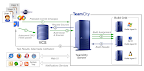
- Programmer在IDE中通过TeamCity的Pre-Tested commit将代码check in到VCS Server
- TeamCity根据其Trigger设置, 定时从VCS Server取代码, 然后将代码发送到Build Agent中. 指派Agent 去执行响应的Build和Unit Test 操作.
- Build Agent完成操作后, 将结果返回给TeamCity.
- 如果结果正确的话, 则将Code 真正提交到VCS.
Monday, July 28, 2008
NDbUnit Framework
NDbUnit test is a good UnitTest framework if you are familiar with C#. But this project seems not active since 2006.
Home Page: http://qualitylabs.org/projects/ndbunit/
Home Page: http://qualitylabs.org/projects/ndbunit/
Monday, March 10, 2008
all about .net framework 3.0(copied article)
All about .NET Framework 3.0 http://aspalliance.com/1351_All_about_NET_Framework_30.all
Published: 10 Jul 2007
Abstract
The .NET Framework 3.0 is the next generation of the .NET Framework that sits on the top of the previous version. It introduces some additional features, and in this article Hima discusses these features in detail.
Article Contents:
Wednesday, February 27, 2008
how to Use Subversion with TortoiseSVN
Keywords: SVN, TortoiseSVN
how to Use Subversion with TortoiseSVN, visit http://www.codeproject.com/KB/books/Subversion_TortoiseSVN.aspx
SVN-How to set ignore-list
Keywords: Subversion, svn, tortoiseSVN
Subversion is a powerful source code control system. We can upload the source code into svn database. In many cases, we do not want to version some types files, such as bin folder and .user file. There are 2 ways to set ignore list.
For example, In .net development, some files need always ignore to verion such as bin obj *.suo *.obj *.pdb *.exe *.dll *.csproj.user
1. For one specific directory, we can use the tortoiseSVN to achieve it.
Steps:
Select one folder in explorer and then select the property menuitem. In Property/Subversion window, click the properties button,
And then click add button, select svn:ignore in the property combobox in subsequence window, Input the file extension in the textbox
2. Set global Ignore list.
Steps:
Find the config file for subversion, which is located in "\Documents and Settings\<user>\Application Data\Subversion" and the file name is Config with no extension.
To get it to ignore these directories or files, you need to uncomment or edit the global-ignores line. In mine, I have it set to:
global-ignores = bin obj *.suo *.obj *.pdb *.exe *.dll *.csproj.user
This will causes it to ignore the bin and obj sub-directories of a typical Visual Studio projects.
Monday, February 25, 2008
ruby dev tools
keywords: Ruby, JDT
One-Click Installer- Ruby interpretor and extenstion(Windows OS)
http://rubyforge.org/frs/?group_id=167
ActiveScriptRuby- Ruby interpretor and extenstion package(Windows OS)
http://arton.hp.infoseek.co.jp/indexj.html
RDE- Ruby Dev Eniviroment
http://homepage2.nifty.com/sakazuki/rde_en/index.html
RDT homepage
http://rubyeclipse.sourceforge.net/
Using the Ruby Development Tools plug-in for Eclipse
http://www.ibm.com/developerworks/opensource/library/os-rubyeclipse
Sunday, February 24, 2008
obfuscator .net Assembly
Keywords: Protection .net assembly
1. Aspose.Obfuscator is free, but use it at you own risk. http://www.aspose.com/Products/Aspose.Obfuscator/
2. CodeVeil is commercial software
http://www.xheo.com/products/codeveil/default.aspx
3. .NET Obfuscator community edition is free. But standard edition is not free.
Wednesday, February 13, 2008
MSDN magazine reader--MSDNReader
Keywords: MSDNReader, MSDN
download: http://code.msdn.microsoft.com/msdnreader
This is a downloadable tool to allow you to read MSDN magazine - which is a great magazine to get up-to-date information on .NET.
Please download and share with your friends too. This requires .NET 3.0 to be installed on your system.
Show all C# exceptions by using Exception_Hunter of Red Gate software
Keywords: Exception, Exception Hunter, Red Gate
How to show all exceptions in you c# project before you release your product? It is important, because we will always leave some exceptions not handled. If you are in the situation, dont worry, you are not alone.
There is a tool can help you. The tool is Exception Hunter, It is a commerical software by Red Gate Software. I think the command line tool is more useful than the UI tool.
Command line usage:
"C:\Program Files\Red Gate\Exception Hunter 1\hunt.exe" /a:"D:\YourAssembly.Exe" /er:"Result_YourAssembly.html" /allpublicmethods
Sunday, February 3, 2008
the powerful DebugView
Keywords: capture debug output, Win32, .Net
DebugView is made by the famous Sysinternals company owned by Microsoft. 我们在程序中通常会有意用debug类(c#)输出一些调试信息, 或者我们要捕捉一些其他人开发的程序是否有异常, 都可以使用这个工具. 只要启动一个DebugView实例, 就可以监控所有程序的debug输出.
它不仅仅可以监视Windows和Console程序的debug, 而且可以监视Web程序的debug输出(需要在Web服务器上运行debugview).
Monday, January 14, 2008
how to build db connection string
Keywords: connectionstring, connection db, JDBC driver
There are too many connection technologies for windows application development such as ODBC, OLEDB, .Net Connection. It is hard to remember all kinds of connection format for all main stream db servers. Luckily, there is one website designed to provide all connection strings. That is http://www.connectionstrings.com/
For JDBC connection tech, there is another web http://www.minq.se/products/dbvis/drivers.html . In this web, you can find what you want.
Tuesday, January 8, 2008
How to load c# and java library in PowerDesigner
Keywords: PowerDesigner, C# library, Java library
Some c# runtime classes may be needed when you are draw one class diagram in PowerDesigner. Sybase has already considered it for you. You can download powerdesigner library package from the www.sybase.com
How to build XPath expression
Keywords: XPath expression, xml tools
There is a software, Exchanger XML can help you to build XPath expression. It has Lite edition with free charge.
It is developed in Java. The production homepage is http://www.exchangerxml.com/
Monday, January 7, 2008
PowerDesigner12.5
Keywords: PowerDesigner 12.5
补丁程序下载: 点击进入下载地址列表
| 软件说明: 1、将pdflm12.dll复制到PD 安装目录下, 2、打开PowerDesigner,菜单Tools -> License Parameters.. 3、选择Standalone Seat - Local License 4、将license.rar解压到一临时目录 5、导入license.lic,或者输入以下信息即可。 详见http://d.download.csdn.net/source/245469 |
Subscribe to:
Posts (Atom)