接下来, 我们讲一下tortoisesvn的常规操作. update, revert和switch的区别, 这三个命令的图标都是从服务器端到客户端的箭头, 容易搞混.
1. update是最常用的操作, 就是用来更新本地的work copy, 当然, 如果某个文档是基于svn server的最新版本做了修改,那么update并不会从svn server上download这个文档. 如果你的文档是基于svn server上的一个老版本作了修改, tortoisesvn会让启动一个向导让你解决这个conflict.
2. revert, 这个操作忽略本地work copy的任何修改, 它直接从svn server上下载被你修改了的文档.
3. switch, switch是update的一个超强版本, update是从原有的svn folder下取代码的, 而switch可以指定另一个folder的URL(但是仅限于在同一个repository之下的另一个folder), switch操作使得本地的work copy指向新的URL, 同时更新versioned file的footprint信息. 这个操作因为不需要download所有文档的内容, 所以速度很快.
4. checkout, 就是将svn上的某个directory所有文档都下载到一个本地目录,同时下载文档的footprint信息, 它要求本地目录必须是空目录. 也叫作fresh checkout.
移动和复制
当我们对源码结构进行重新组织时, 经常会对versioned file进行复制和移动操作. Tortoisesvn的move和copy命令比较隐蔽, 在tortoisesvn菜单上是找不到这些命令的, 只能是先选中要移动的folder/file, 然后按下鼠标右键, 拖拉到另一个目录, 这时候会出现一个弹出菜单, 其中就有SVN copy和SVN move.
TortoiseSVN合并和回滚操作
合并功能是Subversion最大的亮点. 它甚至是改变了我们的开发模式(和Sourcesafe的checkout-lock-checkin模式相比). 当然合并操作本身是很复杂的. 主要有3种合并模式, 需要提醒的是, 合并操作后, 结果仅仅反映到本地的work copy上了, 这时候还没有在svn server上进行merge. 如果你真的要在server上merge的话, 需要再执行commit操作.
合并模式1-(merge a range of revisions):即同一个branch不同版本的merge, 在这个向导中, 你需要指定一个URL(因为已经有个缺省值, 所以一般情况下你不需关心这个), 然后你要指定一个要merge的版本序列, 这个不好理解, 为什么是一个版本序列呢? 在一般情况下, 你只需要指定一个版本号, 并不需要merge几个版本. 但svn仍然提供了一个让你一次性merge多个版本的功能.
合并模式2-(reintegrate a branch): 这是subserver提供的一个非常有用的功能, 它可以将我们的另一个branch代码和本地的work copy进行merge.
合并模式3-(合并两个树): 这应该是三种合并模式中, 最灵活的一种, 选项也最多, 你可以指定两个repository 的URL, 以及相应的版本号码, 然后merge.
版本回滚: TortoiseSVN的rollback功能放在Show Log的界面上了, 最方便的一个回滚方法是: Revert to this revision, 这个很好理解, 就是将版本回滚到你选定的那个版本上, 点击之后, 会将work copy回滚到刚刚指定的那个版本. 需要commit之后, 才会将这个版本真正地在svn server上了.
Monday, August 11, 2008

Tuesday, July 29, 2008
Continuous Integration Tool--CC.Net
TeamCity is good tool, the free version is enough for most small-medium projects.
Cruise Control.Net is absolutely free and open source tool. Actually, it is more hard to configure.
Fortunately, there is a sourceforge project can help you.
cc-config: http://cc-config.sourceforge.net/
PS, CC.Net http://cruisecontrol.sourceforge.net/
Cruise Control.Net is absolutely free and open source tool. Actually, it is more hard to configure.
Fortunately, there is a sourceforge project can help you.
cc-config: http://cc-config.sourceforge.net/
PS, CC.Net http://cruisecontrol.sourceforge.net/
Understand TeamCity Work Flow
首先可以将TeamCity 看作一个专门Continuous Integration(CI)的Web Portal. TeamCity可以管理多个Build Agent, ,每个Build Agent可以认为是专门用来编译代码的机器. 当然Build Agent可以和TeamCity是同一台计算机. TeamCity为什么采用多个Build Agent这样的架构呢?
多个Build Agent的优点:
TeamCity的特点:
多个Build Agent的优点:
- 主要是考虑到Build代码的过程可能能长, 另外是我们可能又想加入Unit Test的功能, 尤其是Unit Test很多的情况下(或者commit source很频繁), 一台计算机显然不行.
- 我们可以将Unit Test按功能分类, 将他们分配到不同的Build Agent上.
- 我们也可以将Unit Test按工作量进行分配, 将他们分配到不同的Build Agent上. 这其实是Load Balance
- 提供Pre-Tested commit特性, 详见下文.
TeamCity的特点:
- TeamCity由Java开发的, 所以是跨平台的, 支持Java和.Net. 它采用Tomcat作为Web Server.
- TeamCity支持多种Build工具, Java方面, 你可以选用Ant, Maven, Idea等. .Net方面, 你可以用MSbuild, NAnt以及Visual Studio的Solution文件.
- Pre-Tested Commit(Delayed commit)方式: 应该说这是TeamCity杀手级的特性(killer feature). 相信我们都遇到过这样的情况, 有的程序员嫌跑所有的单元测试太费时间, 测试了部分Unit Test就将代码提交到VCS上(或者根本没有跑Unit Test). 结果很不幸, 那些没有测试的case结果却跑不通. 你不得不将代码rollback, 其过程之痛苦不用多言. TeamCity介绍了Pre-Tested提交这个特性, 可以彻底解决这个问题. 它是为IDE提供TeamCity的插件来触发这个过程. 详细流程见下文的TeamCity的一般工作流程.
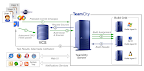
- Programmer在IDE中通过TeamCity的Pre-Tested commit将代码check in到VCS Server
- TeamCity根据其Trigger设置, 定时从VCS Server取代码, 然后将代码发送到Build Agent中. 指派Agent 去执行响应的Build和Unit Test 操作.
- Build Agent完成操作后, 将结果返回给TeamCity.
- 如果结果正确的话, 则将Code 真正提交到VCS.
Monday, July 28, 2008
Continuous Integration Tool--TeamCity
TeamCity is another famous Continuous Integrating Tool. It is much easier to configure than CC.Net because TeamCity is allowed to configure through Web UI. The latter one has too many xml files to configure.
Product Site http://www.jetbrains.com/teamcity/
Free Version License Including
More detail Info, View the following blogs,
Product Site http://www.jetbrains.com/teamcity/
Free Version License Including
- 3 Build Agents at no additional cost
- 20 User Accounts
- 20 Build Configurations
More detail Info, View the following blogs,
- Our Build Config--TeamCity(http://blog.eleutian.com/2008/03/07/OurBuildConfigurations.aspx)
- CruiseControl.NET is dead. Long live Team City!(http://blog.eleutian.com/2007/12/22/CruiseControlNETIsDeadLongLiveTeamCity.aspx)
- Integration of NCover into Team City for Tech Head Brothers(http://weblogs.asp.net/lkempe/archive/2008/03/30/integration-of-ncover-into-team-city-for-tech-head-brothers.aspx)
- Continuous Integration Revisited(http://www.zorched.net/2006/08/10/continuous-integration-revisited/)
NDbUnit Framework
NDbUnit test is a good UnitTest framework if you are familiar with C#. But this project seems not active since 2006.
Home Page: http://qualitylabs.org/projects/ndbunit/
Home Page: http://qualitylabs.org/projects/ndbunit/
Thursday, July 24, 2008
WSE-enabled web service to authenticate by user/password
WSE is short for web service enhancement.
WSE 1 user/password authentication
1. http://www.eggheadcafe.com/articles/20021227.asp
2.http://www.devx.com/security/Article/15634/1954
3. http://www.eggheadcafe.com/articles/20021231.asp ( X509 certification )
WSE 3
1. http://geeknotes.wordpress.com/2007/03/16/a-simple-wse-30-web-service-to-authorize-by-username-and-password/
2. http://blog.nerdbank.net/2006/03/wse3-and-aspnet-membership-provider.html
WSE 1 user/password authentication
1. http://www.eggheadcafe.com/articles/20021227.asp
2.http://www.devx.com/security/Article/15634/1954
3. http://www.eggheadcafe.com/articles/20021231.asp ( X509 certification )
WSE 3
1. http://geeknotes.wordpress.com/2007/03/16/a-simple-wse-30-web-service-to-authorize-by-username-and-password/
2. http://blog.nerdbank.net/2006/03/wse3-and-aspnet-membership-provider.html
Subscribe to:
Posts (Atom)